
As in today’s world Data is the new oil for big tech giants like Facebook, google, they rely on user’s data the more the data is better chances for getting more money from big enterprises and companies to show ads to the specific user base, so they can sale their products. So what is meant by data here lets elaborate it a little more for you all.
What is Data ?
As in personal information Google might collect far more personal data about its users. Google records every search you perform and every YouTube video you watch and search history of YouTube liked videos etc. Whether you have an iPhone or an Android doesn’t matter, Maps keep a log anywhere you go, the route you use to travel to office or to home get there and how long you stay there — even if you never open the app it keeps a log. When you look closer and start to notice at everything Google knows about you, the results can be so terrifying. Thankfully, there are many ways you can stop google doing all this at least to a limit.

This is an image of big data centers which are big halls with fully air-conditioned to keep the halls cool all time this is where online data are kept about its users.
New policy !
By June 2020, any new Google accounts will delete the data private data of any user automatically delete. But after 18 months by default. And only if you’re starting or joining Google as a new user now. That’s great only for people who are just joining Google by creating a Gmail address or you just got your first Android phone, but if you’re among the 1.5 billion people on Gmail or the 2.5 billion people who are using Android already on there day to day life, there account is set to hold onto your there private data forever unless you tell Google to delete it or set a schedule to delete it automatically after some time.
How to delete or remove your private information data from Google?
Let’s discuss what you can do to stop google to keeping your data and turn off features like location tracking and collection of searches and everything.
Well Google give you many facilities to control your data by yourself there are features from which you can turn it off and keep yourself private.
How to turn it off on an Android device?
Let’s start if you are logged into your account now just go to Google App present in your android device at top right-hand side you’ll find a circular icon click on that and it’ll pop up and show you your email address and below that you can see written “Manage Your Google Account” click on it and it’ll open a new window of Google account in that you can see many options like Home, Personal info, Data and personalisation etc.

Click on Data and Personalisation in that you’ll get Activity Control.
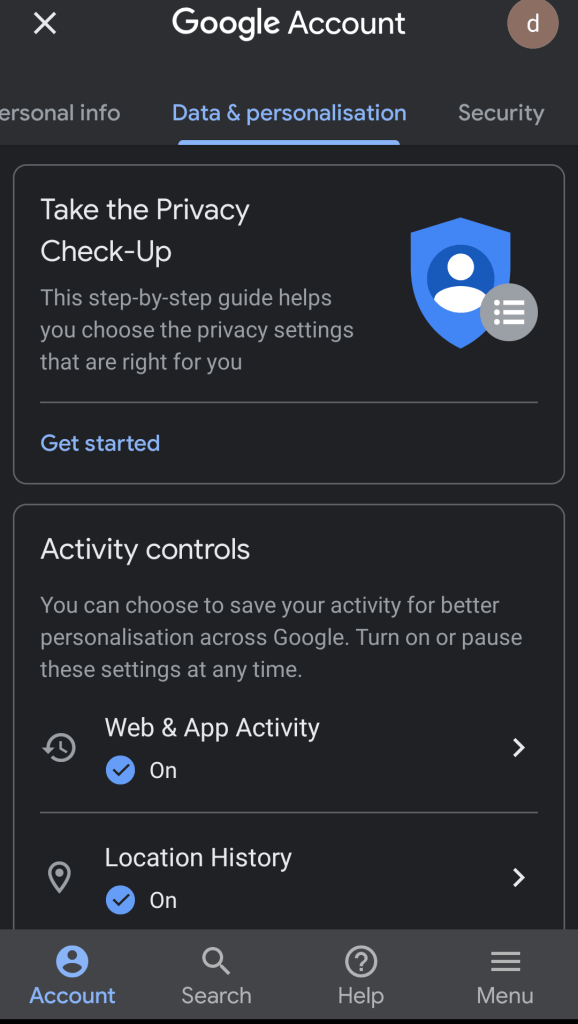
Here you’ll see Web & App Activity, Location history, YouTube history scroll down you can click on Manage your Activity Control after which a new window will appear.
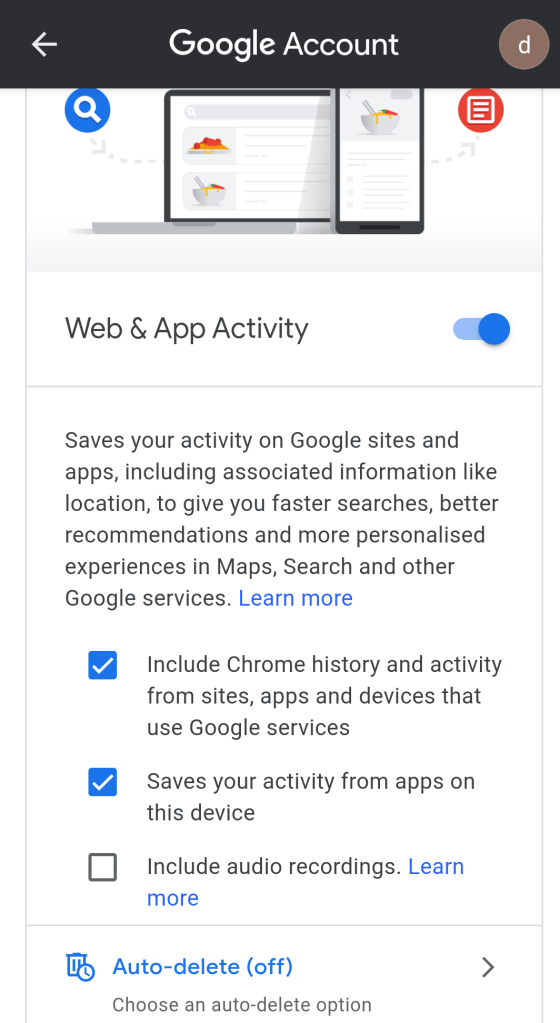
Click on that blue switch and turn off the setting you can also see your past searches and data you can delete your past data immediately if you want after deleting it you can select auto delete option if you don’t want to turn the setting off and change the option to your preference. Same you can do with Location and Youtube History there is one more option at the end of the page Ad personalisation you can turn it off too if you want. After this google won’t gonna track you at all and not gonna keep your data.
For IOS and PC user the same process apply you just have to go to manage your account and you’ll get this same option there.
In future blog we’ll discuss how and what Applications you should allow in your mobile phones and how some Apps are dangerous for your privacy and can take your data without your knowledge.
One more thing to keep in mind
Its a warning, Now just because you turned off Google not to track your online or offline activity doesn’t necessarily mean you’ve closed off your data to Google completely. Google has accepted that it can track your physical location even if you turn off your location using information which it gathers from Wi-Fi and other wireless signals around your phone. Also, just like Facebook has been found guilty of doing this for years with its user, Google doesn’t even need you to be signed into your account to track you.
Email – republictechnology@outlook.com
 Republic Technology
4 replies on “Why should you care about your privacy ?”
Wow,well explained
LikeLiked by 1 person
😊 thanks wanted to spread awareness about the privacy
LikeLike
Great blog, everyone need to know this, privacy matters and if they track each and every data of ours were more and more under watch by them and are ruled by them they show us what we want and suggest places based on where we’ve been. Unknowingly we’re already under their spell.
LikeLiked by 1 person
yeah thats true hope you get aware of your privacy
LikeLike